FortiLink over P2P Wireless Bridges
This article explains how to configure FortiLink over a point-to-point wireless bridge solution.
FortiLink point-to-point mode carries an inter-switch link across a layer-2 bridge. Fortinet documents it from FortiSwitchOS 6.4.0; it changes the LLDP destination to a broadcast address so intermediate devices can forward discovery traffic. Enable it at both ends and keep the TPID identical (default 0x8100). See Fortinet's point-to-point FortiLink guide.
The lab setup:
- 1x FG-120G (v7.6.3)
- 1x FSW-108E-FPOE (v7.4.6) – LOCAL SWITCH (assumed already in place)
- 1x FSW-224E-POE (v7.6.2) – REMOTE SWITCH (assumed factory-reset)
- 2x Ubiquiti Building Bridge (v3.1.5)
Check the FortiLink release notes and compatibility matrix for the versions being deployed. The bridge must preserve the required VLAN-tagged traffic and broadcast discovery frames; verify management reachability and traffic forwarding before relying on the link.
Test topology:
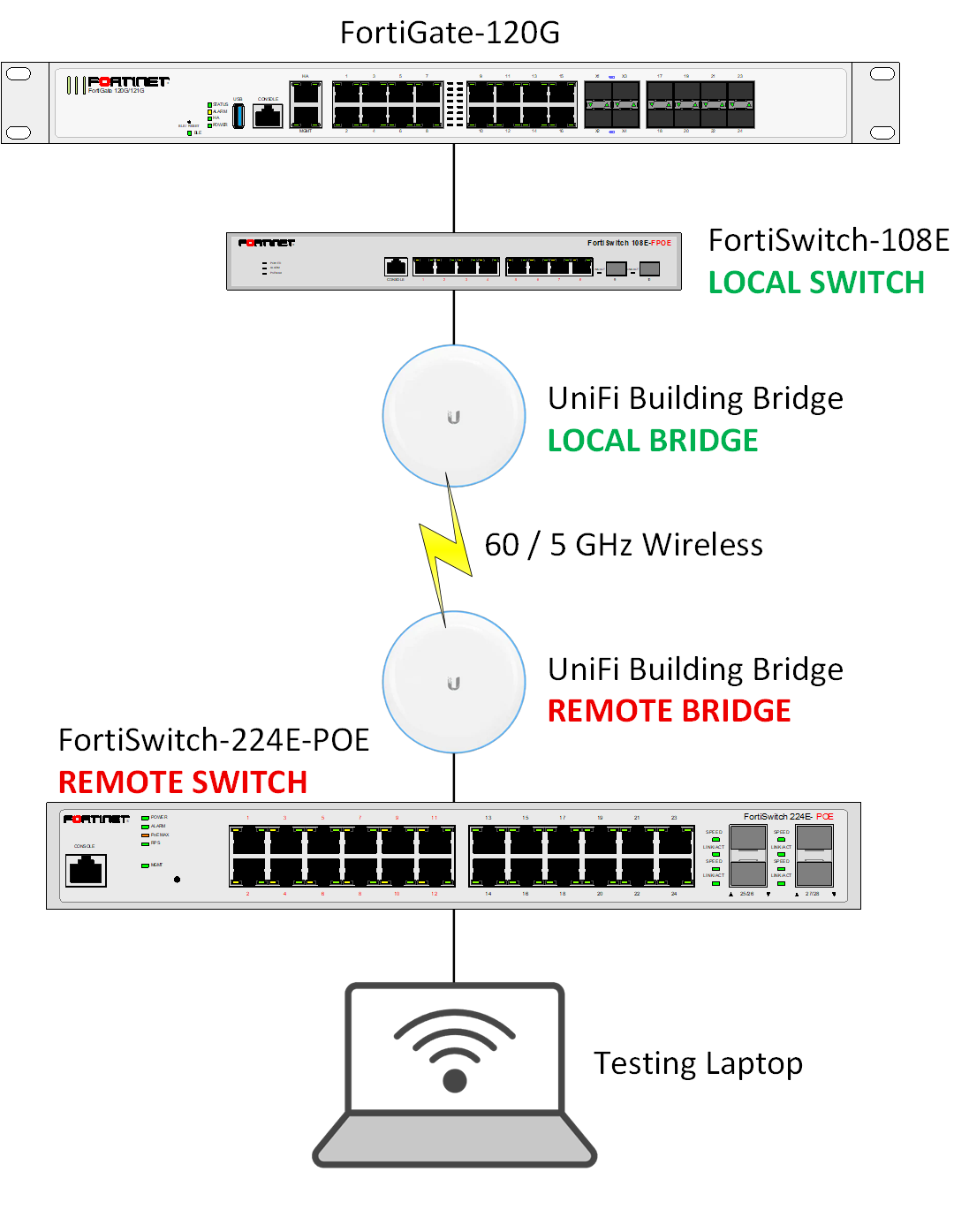
Instructions
fortilink-p2p-native-vlan sets the native VLAN on the P2P ISL. <MGMT-VLAN-ID> below is the native VLAN used for bridge management in this lab. Configure its addressing, DHCP or static addresses, and controller reachability separately. The default P2P native VLAN is 4094; the remote switch's internal FortiLink management interface also uses 4094 in this example. See the FortiSwitch CLI reference.
- Log in to the LOCAL SWITCH via SSH.
- Run the following commands on the LOCAL SWITCH:
config switch physical-port edit "<DOWNLINK-PORT>" set fortilink-p2p enable set lldp-profile "default-auto-isl" next endReplace
<DOWNLINK-PORT>with the port facing the LOCAL BRIDGE.
config switch global set fortilink-p2p-native-vlan <MGMT-VLAN-ID>endReplace
<MGMT-VLAN-ID>with the VLAN to be used for wireless bridge management.
- Log in to the REMOTE SWITCH via console cable (115200 baud in this lab).
- Run the following commands on the REMOTE SWITCH:
config switch physical-port edit "<UPLINK-PORT>" set fortilink-p2p enable set lldp-profile "default-auto-isl" nextendReplace
<UPLINK-PORT>with the port facing the REMOTE BRIDGE.
config switch interface edit "internal" set native-vlan 4094 nextendconfig switch global set fortilink-p2p-native-vlan <MGMT-VLAN-ID>endReplace
<MGMT-VLAN-ID>with the VLAN to be used for wireless bridge management.
- Connect the LOCAL BRIDGE to the nominated port on the LOCAL SWITCH.
- Connect the REMOTE BRIDGE to the nominated port on the REMOTE SWITCH.
- The two bridges should establish a link, and the remote FortiSwitch should appear on the FortiGate for authorisation.
Optional: UniFi Network Controller Adoption
For a self-hosted UniFi Network application, first try normal device adoption. If manual layer-3 adoption is needed, SSH using the device credentials. Ubiquiti documents ui / ui for newer unadopted devices and ubnt / ubnt for older ones; adopted devices use the SSH credentials configured in UniFi Network. See Ubiquiti's SSH guidance.
Where supported by the bridge firmware, set the inform address:
set-inform http://<CONTROLLER-IP>:8080/informReplace
<CONTROLLER-IP>with the UniFi Network host. Allow TCP 8080 from the device to that host and complete adoption in UniFi Network. Ubiquiti notes thatset-informmay need to be repeated after discovery. See the official layer-3 adoption procedure.